
Not too long ago, I thought pro-level audio interfaces were only for big studios. You know, the kind with racks of glowing gear and someone behind a massive mixing console that looks like it belongs in a spaceship. But after finally swapping out the bargain-bin gear in my own setup, the difference was instant. Suddenly, my tracks had that crisp, polished sound I’d been chasing for years.
The best part? You don’t need a fancy studio or a five-figure budget to get that kind of quality anymore.
Gear has come a long way. Today’s audio interfaces are faster, cleaner, and easier to use. And there’s something out there for just about every budget. That said, not every interface is the right fit for how you record. Some are better for vocals. Some shine with guitars. Some are all about plug-and-play simplicity.
In this guide, I’m skipping the fluff and focusing on what actually matters when choosing an interface. Things like how many inputs you really need, how easy it is to use, and whether it’s going to hold up after months of real-life recording sessions. I’ve tested a bunch of them, and I’m breaking down the ones that deliver the best value and sound.
Let’s walk through the best audio interfaces in 2025. Whether you're tracking vocals in your bedroom, jamming with friends, or streaming your latest session, there’s a pick here that’ll help you sound your best.
Quick List of the Top Audio Interfaces
If you're short on time or just want the highlights, here’s our go-to list of the best audio interfaces right now. Each one earns its spot for a clear reason, whether it’s top-tier sound or just crazy good value. We’ll break each of these down in full below, but this list gives you a quick snapshot.
- Universal Audio Apollo Twin X QUAD Heritage - Best Overall Professional Audio Interface
- Behringer U-Phoria UMC22 - Best Budget Audio Interface
- Focusrite Scarlett 2i2 4th Gen - Best Audio Interface for Home Recording
- Audient iD4 MKII - Best Beginner Audio Interface
- Solid State Logic SSL 2 Plus MKII - Best Audio Interface for Podcasting
- MOTU M4 4x4 - Best Audio Interface for Streaming
- Universal Audio Volt 2 - Best USB Audio Interface
Scroll down to see the full reviews for each one and find out which is the best fit for your setup.
Best Audio Interfaces
These are the top audio interfaces that actually leveled up our recordings. We’ve tested them in real sessions and picked each one for how well it solves common problems for musicians, podcasters, and creators.
We’ll break down what each does best, who it’s for, and how it can fit into your setup.
Apollo Twin X QUAD Heritage

If you're chasing pro sound without leaving your home studio, the Apollo Twin X QUAD Heritage is one of the best audio interfaces we've used. Honestly, it’s a total game-changer.
What We Like:
- Near-zero latency makes it easy to record with real-time effects
- Studio-level clarity with incredible A/D and D/A conversion
- Comes with premium UAD plug-ins that instantly upgrade your mix
What To Keep In Mind:
- It’s pricey, especially compared to beginner options
- Only two mic inputs, so it's not ideal for tracking full bands
- LUNA software is Mac-only, which could be a dealbreaker for PC users
I made the jump from a Focusrite Scarlett to the Apollo Twin X DUO about a year ago and haven’t looked back. The sound upgrade was immediate. Tracks sounded cleaner, vocals were more detailed, and even basic guitar takes felt more alive.
What really stood out was how much processing the Apollo handles on its own. It takes a big load off the computer, which lets me run more plug-ins and keep things moving during bigger sessions. Those included UAD plug-ins? Total magic. I’ve used them to polish rough demos into songs that actually feel finished.
One thing I wish I’d done differently? I’d have gone straight for the QUAD. The extra DSP power means I could stack even more plug-ins without hitting a wall. If your budget has room, it’s worth the upgrade.
Bottom line: if sound quality and a smooth workflow matter to you, the Apollo Twin X QUAD Heritage is an investment you’ll feel every time you hit record.
Related: UAD Apollo Twin X Interface: Music Producer’s Full Review
Behringer U-Phoria UMC22 Audio Interface
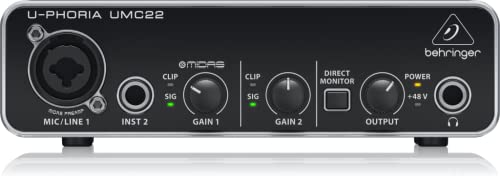
If you're just getting into home recording and don’t want to drop a ton of cash, the UMC22 is a solid starting point. It's simple, sturdy, and sounds better than you'd expect at this price.
What We Like:
- The Midas preamp gives a clean, warm sound that surprised us
- Metal build feels way more durable than other cheap interfaces
- Powered through USB, so no need for extra cables or power bricks
What To Keep In Mind:
- Only one mic input, so it’s best for solo recording
- If your cables are loose, you might get a little noise now and then
- It doesn’t come with much in terms of extras or software
We tried this out with a basic vocal and guitar setup and were honestly impressed. Setup was super easy. Just plug it in, fire up your DAW, and you're good to go. The preamp has enough gain for most mics, and the sound is clean and clear. It may not come with bells and whistles, but it gets the job done.
The tough build is a bonus. We tossed it into a backpack more than once without worry. It’s small enough to stay out of the way on your desk, and USB power keeps your setup simple.
If you're recording solo and need something reliable without overspending, the Behringer U-Phoria UMC22 checks all the right boxes. It’s not built for full bands or multi-mic sessions, but for beginners or basic setups, it’s a great first step.
Focusrite Scarlett 2i2 4th Gen

If you’re looking for something dependable that just works in a home studio, the Scarlett 2i2 4th Gen has been a go-to in our setup. It handles the daily stuff without fuss and delivers a sound that’s clean and pro enough to share.
What We Like:
- The preamps are crisp and give your tracks a strong starting point
- Auto Gain helps keep your levels in check, especially on dynamic vocals
- Comes with bundled software that’s actually useful out of the box
What To Keep In Mind:
- Two inputs is fine for most setups, but can feel tight if you’re using multiple instruments
- Setup can feel a little clunky the first time around
- The bright red case might not be everyone’s vibe
When we plugged this in for the first time, it felt solid and ready to work. The knobs respond well and we liked how quickly we could jump into a session. “Air” mode adds a nice shimmer to vocals and the headphone output is powerful enough to catch those small mix details.
That said, if you’re running a few pieces of gear at once, you’ll probably want more inputs. We also had to dig through some setup steps before getting started, but once we were in, it was smooth sailing.
For anyone doing solo projects or running a compact studio, the Focusrite Scarlett 2i2 4th Gen is a super reliable pick. It’s one of those tools that doesn’t get in your way, and that’s exactly what we want when creativity hits.
Audient iD4 MKII

If you're after clean sound and an easy setup that just works, the Audient iD4 MKII is a solid choice. We’ve used it for vocals, guitars, and quick sessions, and it delivers every time.
What We Like:
- Tough, metal build that holds up to regular use
- Class A preamp gives you rich, detailed sound
- Plug-and-play with Mac, PC, and even iOS
What To Keep In Mind:
- Not quite enough gain if you’re using dynamic mics like the SM7B
- Two inputs might feel limiting if you're tracking more than one source
- A little bigger than some compact interfaces
The first thing we noticed was the build. It feels solid in the hands, and everything from the knob movement to the layout is smooth. We had it set up and ready to go in under five minutes, and there were zero hiccups with drivers or software.
For vocals and guitar work, the preamp really shines. You get that clean, professional tone right out of the gate. The USB-C connection also keeps things simple and helps cut down on clutter.
If you're using a low-output mic, you might want to pair this with something like a Cloudlifter for a little more juice. And if you’re planning to mic up a whole drum kit or full band, the two inputs will definitely feel tight.
Still, for solo recording, voiceover work, or portable setups, the Audient iD4 MKII punches above its price. It’s a no-fuss, pro-sounding box that gets the job done without wasting your time.
If voiceover work is part of your setup, pairing this interface with the right mic makes a huge difference. Take a look at our guide to the best microphones for voice over to see which mics work best with interfaces like the Audient iD4 MKII.
Solid State Logic SSL 2 Plus MKII Audio Interface

If you're after clean sound, rock-solid build, and a few modern touches, the SSL 2 Plus MKII is a great pick that feels like it was made for creators who care about tone and workflow.
What We Like:
- Pro-quality mic preamps with rich, punchy sound
- Comes with a solid software bundle to help you start creating fast
- Two headphone jacks make collab sessions way easier
What To Keep In Mind:
- No power switch, which might bug some folks
- The extra outputs don’t really help much if you’re running a four-speaker setup
- It’s not huge, but you’ll want a little room on your desk
The first time we plugged this in, we could hear the SSL difference. Vocals and guitars sounded smooth and full, even when we were using a basic dynamic mic. Hit the 4K button and it adds a nice bit of sparkle that works especially well on pop or rock tracks.
The two headphone outs are clutch when you're working with someone else. No adapters or headphone splitters, just plug in and get to work. We also liked how simple the controls were. No weird software hoops to jump through, and it played nice with both Mac and Windows.
SSL includes some useful plug-ins too, so you’re not starting from scratch. We do wish it had a power switch, and if you're trying to run four monitors from it, you’ll probably run into some limitations. Still, the SSL 2 Plus MKII delivers where it matters most. It’s one of those interfaces that feels like it belongs on a serious desk, even if that desk is in your bedroom.
MOTU M4 Audio Interface

If you want detailed audio and a no-hassle setup, the MOTU M4 is one of the most reliable interfaces we’ve used. It’s easy to work with, sounds fantastic, and puts all your controls right where you need them.
What We Like:
- Clear and rich audio quality that holds up in any mix
- All main controls on the unit
- Clear screen with lots of info
What To Keep In Mind:
- Doesn’t come with a USB-C to USB-C cable
- Knobs are a bit small, especially if you’ve got bigger hands
- Needs to draw power from your computer, so no stand-alone use
The first thing we noticed when plugging it in was the sound. It’s clean, balanced, and didn’t need much tweaking. Even with a quiet mic, we got solid gain without noise. The LCD screen is one of those things you don’t think you’ll care about until you use it. Seeing your levels at a glance without flipping through a DAW menu is just plain useful.
We also liked the physical knobs. Everything you need is right there on the front. You’re not hunting through software just to boost your input or adjust your monitor mix. It worked smoothly on both Mac and Windows during testing, and setup was about as painless as it gets.
Streaming? Podcasting? Quick vocal takes? The MOTU M4 does all of that with zero drama. We do wish it came with a better cable out of the box, but if you’ve already got USB-C gear, you’re good to go. This one’s a workhorse for small studios or creators who want pro sound without overcomplicating the setup.
Universal Audio Volt 2 Audio Interface
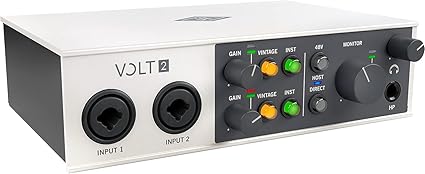
The UA Volt 2 is one of those interfaces that just makes sense. It sounds great, looks cool on the desk, and gets you recording fast without a bunch of setup headaches.
What We Like:
- Full, detailed tone for vocals and instruments
- Sturdy build with a nice vintage look
- Simple controls make recording easy
What To Keep In Mind:
- Limited control options for advanced users
- Some of the bundled software needs extra setup time
- A few features require additional license purchases
As soon as we plugged this in, we could hear the difference. The tone felt rich and full, especially on vocals and guitar. That vintage preamp switch adds a nice bit of color that’s perfect for old-school vibes or warming up a cold digital mix.
Setup was quick. We didn’t have to dig through manuals or mess with drivers. Just plug it in, adjust a couple knobs, and you’re off. It also stays put on the desk, which sounds small but actually matters more than you’d think during long sessions.
The controls are super simple, which is great for staying focused but not ideal if you’re someone who wants to fine-tune every aspect of your signal chain. Still, we’d take that trade-off for the sound and speed it gives us.
If you're looking for a clean, reliable interface that nails the essentials and sounds way better than it should at this price, the Universal Audio Volt 2 is an easy recommendation.
What to Consider When Choosing an Audio Interface
Finding the right audio interface can totally change how your home studio runs. It’s not just about the most expensive option or whatever has the longest spec sheet. What matters is how well it fits the way you actually make music. These are a few things we wish we knew before buying our first interface.
Connectivity
Let’s start with how your interface connects to your computer. Most options fall into three main types: USB, USB-C, and Thunderbolt.
- USB works with pretty much every computer, whether you’re on a Mac or PC.
- USB-C is newer and faster, and it’s becoming the standard on modern laptops and iPads.
- Thunderbolt is the fastest and most stable, but it’s mostly found on Macs.
If you bounce between Mac and Windows machines, USB is usually the easiest. When we switched from USB to Thunderbolt, we noticed sessions loading quicker and fewer hiccups with big projects. But if you’re running your setup off an iPad or a newer MacBook, USB-C is super convenient and skips the need for weird adapter cables. Just make sure the interface matches the ports on your device.
Input/Output Requirements
Let’s break down how many inputs and outputs you might actually need. If you're a solo artist working with a mic and an instrument, most 2-in/2-out interfaces are totally fine. You can plug in your guitar and vocals at the same time and start recording without a hitch.
But if you’re planning to record a group, a full drum kit, or multiple synths, you’ll want something bigger.
Here’s a quick way to think about it:
- If you're recording a duo with two mics or guitars, 2-in/2-out might work, but it can feel cramped.
- For a small band setup, like drums, bass, and guitar, go for an interface with at least four to eight inputs.
- If you’ve got a bunch of external gear like synths or effects units, extra outputs are super helpful for routing.
If you're planning to scale your studio or want a setup that keeps things organized as you add more gear, this guide to the top rack mounted audio interfaces can help you choose an option built for expansion.
And if you’re doing a podcast with a few guests, look for an interface with three or more mic preamps. Even if you’re not there yet, grabbing one with room to grow can save you from upgrading again too soon.
Preamps and Converters
This is where a lot of the magic happens. A solid preamp brings out the clarity in your mic or instrument and keeps things from sounding muddy or dull. We’ve noticed a big difference when switching from basic preamps to something higher-end.
If you’re chasing cleaner vocals or more detail in your acoustic guitar, strong preamps really help. And if your main mic is the SM7B, here are the best preamp choices for the SM7B for getting that clean gain without hiss.
Interfaces from Universal Audio and Audient are known for this. They give you smooth gain and make it easier to get that pro sound without extra noise.
Then you’ve got converters. These take your analog input, like a voice or guitar, and turn it into digital audio your computer can work with. Better converters help your recordings sound natural without weird digital harshness.
You don’t have to go crazy with specs, but if your budget allows, it’s worth choosing an interface with a reputation for clean conversion and reliable preamps. Your mixes will thank you.
Latency
Latency is that little delay between playing or singing and hearing yourself in your headphones. Sometimes it's no big deal, but when you're tracking vocals or using virtual instruments, even a small lag can throw everything off.
Most interfaces these days handle latency pretty well, but it’s still worth paying attention. Look for terms like ultra-low latency, zero-latency monitoring, or built-in DSP. That DSP part means the interface handles some of the processing itself, which helps you hear your effects in real time without your computer freaking out.
If you're layering guitar tones or tweaking synths as you record, lower latency makes everything feel more natural. You don’t have to blow your whole budget, just make sure the one you’re looking at actually delivers what it promises. We’ve tested a few that talked a big game but didn’t quite keep up.
Software Compatibility
Some audio interfaces just play better with certain DAWs. If you're using Logic Pro or GarageBand, you’ll probably have the smoothest ride with something from Apogee or Universal Audio. On the other hand, Ableton Live and FL Studio tend to work really well with brands like Focusrite or PreSonus.
It’s a good idea to check whether the interface supports your go-to software and system, whether that's a Mac, PC, or even an iPad. Also, don’t sleep on the extras. A lot of interfaces come with free plugins or virtual instruments that can give your sessions a serious jumpstart.
If you’re running Logic Pro on a Mac, we’ve found that Apogee or UA interfaces are super solid. Less setup hassle, better sound right out of the gate. Just be sure to check for required drivers or bundled software before you buy so nothing gets in the way of creating.
Final Thoughts: Which Audio Interface Is Right for You?
Choosing the right audio interface doesn’t have to be stressful. It really comes down to what you need and how you like to create. If you’re just starting out, the Behringer U-Phoria UMC22 is a great way to get going. It’s simple, affordable, and does exactly what it needs to without any extra fuss. For more experienced producers or anyone who wants a pro-level setup, we’re big fans of the Universal Audio Apollo Twin X QUAD. The sound is incredibly clear, the build is solid, and it makes sessions smoother from start to finish.
If you’re focused on streaming or podcasting, the Focusrite Scarlett 2i2 is a solid pick. It has that clean preamp sound and just works without a lot of tinkering.
The key is not feeling like you have to go big right away. Starting small is totally fine. You can always upgrade later as your skills grow and your setup expands. There’s no perfect interface for everyone, but there is one that’s perfect for where you are right now. And when you land on the right one, it can seriously level up your sound and workflow.
If you’re putting together a full setup, check out our home recording studio bundle guide. You can also see exactly what I use in my own setup in Lance’s Picks: My Own Home Recording Studio Equipment.
Thanks for hanging out and reading. Hope this helped you dial in your next audio interface. Catch you in the next one.
FAQs About Audio Interfaces
High-end audio interfaces are worth it if we need pro-level sound, low latency, and steady performance. They bring top preamps, rock-solid drivers, and often include useful software. From our experience, jumping to a higher-end model made our mixes clearer and added more detail right away.